OK so you have your new project, it’s named, and ready for you to begin making a game. So what now? Well, you remember the “declarations” section we discussed in part 1? That’s where we will start. Like I said I am throwing you all in the deep end here – I have awful teaching skills unfortunately and all I can say is, sink or swim 
OK we have 2 lines in the declarations section already. In my entire 20+ years of experience I have never had to touch those two lines. But I suppose they need an explanation. Basically the first one is for the graphics card; it’s so that as a programmer I have certain powers now. Mostly relating to video game graphics. The second line is for 2D related graphics, you will see it being used a lot later on.
Anyway, underneath those two lines, and above the endregion statement, we will begin to write the code for our game. So let’s say we have a score system, so maybe a high score table or at the very least a single highest score to beat. Let’s tackle that.
Now, I would suggest using an integer value, which is, a single whole number, with no fractions possible. So the number 2.1 would be invalid. In fact it would throw an error if I tried to store that value as an integer. It would be a disaster for my program.
Pay attention to the words here because they will mean something and you have to learn them to understand these instructions as well as be able to communicate well with other programmers. In order to hold a high score, we are going to “declare” a “variable”. It’s called a variable because its contents are… variable. Now, it’s simple enough, we just use the keyword “int” to define it as an integer value, and give it a good name, such as “playerScore”. Notice the lower case P – it helps when typing fast – and the second, third etc word has a capital letter. That’s how many programmers write their variable names. I suggest you do the same. Also, place a semicolon at the end of the sentence, like so…
int playerScore;So now you should have 3 lines in your declarations section, one being the line we just created. Now, if you look down through the code, you will notice that the code is separated into different groups. If you hover the mouse over the left margin of the screen, you will notice little arrows next to the title of each block, and if you click it, it will expand or collapse that entire block of code, just like the region statements do. Go down through the list and click each arrow so that your code looks like this…
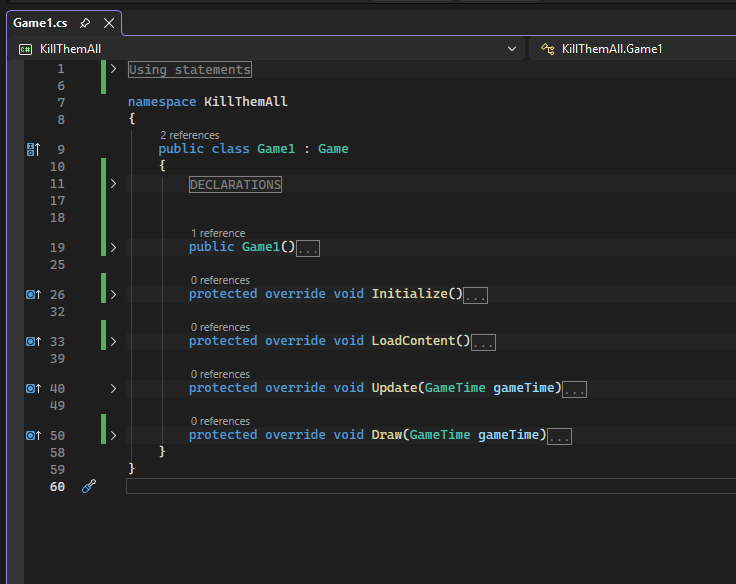
OK let’s take a look at things from a wider perspective. All of these blocks of code (except the first one) are called “methods”. A method is basically a block of code that executes when called to do so. Sometimes it returns a value to where it was called from. If that sentence did not make sense to you it’s fine. You haven’t drowned yet.
Now, the first one that says “Game1” always executes when the program loads (well, they all do, but this one happens first). Note that it happens after the declarations.
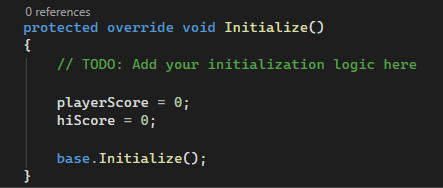
Once all of the commands in “Game1” are executed the program will then move onto the “Initialize” method, where any special considerations to the variable space created in the declarations section will be taken care of. Yeah, you wouldn’t know what to write just yet, I know. But let’s put something in there. Navigate to the “Initialize” method, click its little arrow to expand it again, and put this line of code inside it, just after the comment and before the existing line of code…
playerScore = 0;Don’t forget to add the semicolon at the end. What this line does is change the value of “playerScore” to zero when the program loads. If we had a variable called “level” then we might want to set it to 1 here too. But we don’t have a variable called “level”. So far we have only created “playerScore”. And even if we did have a variable called “level”, as well as other variables/data we might need to start a new game, it would make sense to set up the data in its own method named “StartNewGame” or something like that; but for now I want to keep things easy so we will just define one or two variables and keep things as simple as possible.
With that said, let’s go back to the declarations section and add another variable. This time, we are going to create another integer variable called “hiScore”.
int hiScore;And again, in the “initialize” method…
hiscore = 0;This will set the hiscore to zero only when the program first loads.
So, your “Initialize” method should now look like this…
Alright, this is all well and good but you can probably tell, if you run your program it still doesn’t *DO* anything. We created a score and hiscore variable, and we set them both to zero, but we aren’t doing anything with them. The program still runs, but essentially, nothing is happening. So let’s change that in part 3.
 MAKE A 2D VIDEO GAME!